
If you think, "Is it broken?"
If you think there might be a malfunction, please check the following before requesting an inspection or repair.
Mi Energy Electrotherapy Device
Electrotherapy Device: Reltech MD21
| Symptoms | Possible Causes and Solutions |
|---|---|
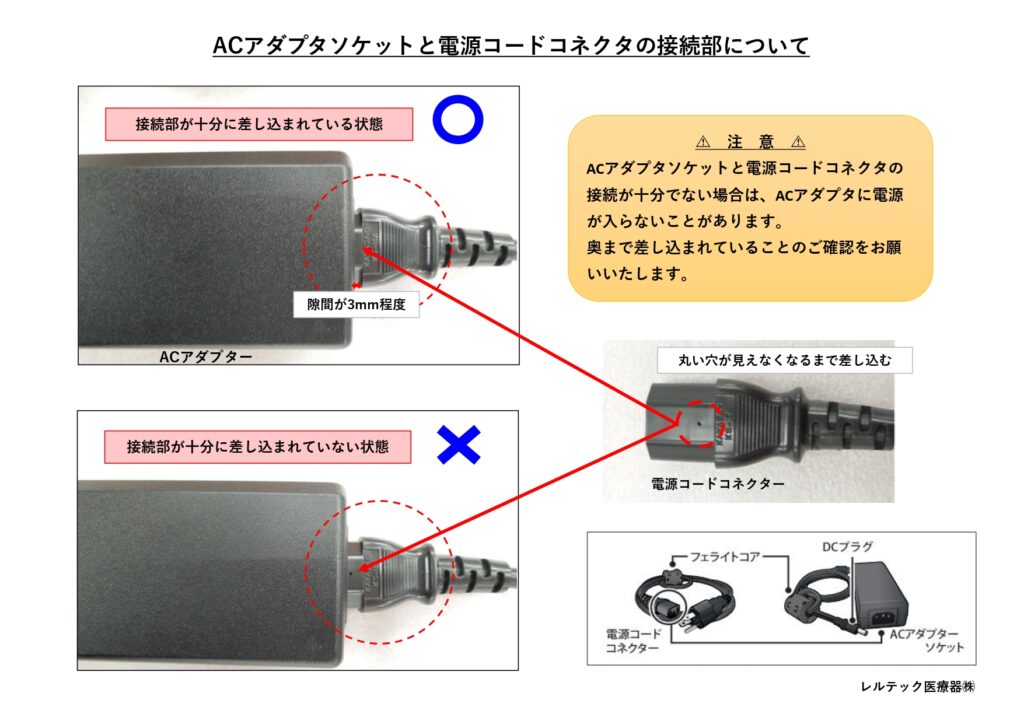
| The device does not turn on even when I press the power switch. The display does not light up. | The power cord or AC adapter is not connected properly. Please plug the DC plug into the DC plug socket on the back of the unit. Plug the power cord connector into the socket on the AC adapter. (See the figure below.) Plug the power cord into an electrical outlet (100 V AC). |
| When I press the button, there is no operation sound. | The volume is set to "b-0." Set the volume to a value between “b-1” and “b-3.” ( ) |
| After the treatment ends, the completion tone does not sound. | The volume is set to "b-0." Set the volume to a value between “b-1” and “b-3.” ( ) |
| When inspecting the electrodes during an Energy Check, "OK" does not appear at . | I'm touching the output plate (AC) with my hand. Please remove your hand from the plate and check the unit. |
| I'm missing it because it's on the screen for such a short time. Please check it again. If it appears even for a split second, it’s working properly. | |
| You haven't pressed the power button on the device itself. Please press the power button. | |
| The plate isn't properly inserted into the Energy Check slot. Please place the plate properly into the slot on a level surface and check again. | |
| I've been checking it over and over again. Please wait a while and check again. |
Electrotherapy Device: Reltech MD11
| Symptoms | Possible Causes and Solutions |
|---|---|
| The device does not turn on even when I press the power switch. The display does not light up. | The power cord or AC adapter is not connected properly. Please plug the AC adapter into the AC adapter port on the back of the unit. Plug the power cord connector into the AC adapter socket. (See the figure above.) Plug the power cord into an electrical outlet (100 V AC). |
| An error message appears. | The electrode plug is not properly connected to the socket. Please insert the electrode plug into the electrode socket. ( ) |
| When I press the button, there is no operation sound. | The volume is set to "b-0." Set the volume to a value between “b-1” and “b-3.” ( ) |
| After the treatment ends, the completion tone does not sound. | The volume is set to "b-0." Set the volume to a value between “b-1” and “b-3.” ( ) |
| When inspecting the electrodes during an Energy Check, "OK" does not appear at . | I'm touching the electrode plate with my hand. Please remove your hand from the plate and check it. |
| I'm missing it because it's on the screen for such a short time. Please check it again. If it appears even for a split second, it’s working properly. | |
| You haven't pressed the power button on the device itself. If the unit is not in operation, press the operation button. | |
| The plate isn't properly inserted into the Energy Check slot. Please remove your hand from the plate and check it. | |
| I've been checking it over and over again. Please wait a while and check again. |
Electrotherapy Device: MSD reltec
| Symptoms | Possible Causes and Solutions |
|---|---|
| The device does not turn on even when I press the power switch. The display does not light up. | Is the AC adapter connected properly? Please plug the DC plug of into the AC adapter port on the back of the unit. Plug the AC plug of the AC adapter into an outlet (100V AC). |
| The display is flickering, and an error tone is sounding. | Is the plug on the electrode plate properly connected to the socket? Please insert the plugs for the output plate (ACs) and the 0V plate (BD) into their respective sockets. ( ) |
| Are the electrode plates in close contact with your body? Please wear the electrode plates correctly. If you are wearing them over your clothes, please wear lighter clothing or wear them directly on your skin. (See “How to Wear” page 16.) | |
| Have you left the battery terminals disconnected while driving? Please turn the power switch to the OFF position. ( ) | |
| The LED (power-on indicator) is flashing, and an alert tone is sounding. | Is the plate damp from sweat or something? Please move the plates away from your body and let them dry. ( ) |
| Is the environment too humid? Please ensure the operating environment is appropriate. ( ) |
Electron Supply Unit HD21
| Symptoms | Possible Causes and Solutions |
|---|---|
| The unit does not turn on even when the power switch is turned on. The timer display does not light up. | The power cord or AC adapter is not connected properly. Please plug the AC adapter into the AC adapter port on the back of the unit. Plug the power cord connector into the AC adapter socket. (See the figure above.) Plug the power cord into an electrical outlet (100 V AC). |
| An error message appears. | The plug for the output plate AC or the 0V plate BD/YD is not properly connected to the socket. Please insert the plugs for the output plate AC and the 0V plate BD into their respective sockets. ( ) |
| When I press the button, there is no operation sound. | The volume is set to "b-0." Set the volume to a value between “b-1” and “b-3.” ( ) |
| After the treatment ends, the completion tone does not sound. | The volume is set to "b-0." Set the volume to a value between “b-1” and “b-3.” ( ) |
| When inspecting the electrodes during an Energy Check, "OK" does not appear at . | He is touching the plate with his hand. After inserting the output plates (AC) and the 0V plates (BD/YD) into the Energy Check ( ), remove your hand from the plates and inspect them. |
| I'm missing it because it's on the screen for such a short time. Please check it again. If it appears even for a split second, it’s working properly. | |
| You haven't pressed the power button on the device itself. If the unit is not in operation, press the operation button. | |
| On a level surface, the AC output plate and the 0 V plates BD/YD are not properly inserted into the Energy Check port. On a level surface, insert the output plate AC and the 0V plate BD/YD properly into the slots, and check again. | |
| I've been checking it over and over again. Please wait a while and check again. |
Electron Supply Unit HD11
| Symptoms | Possible Causes and Solutions |
|---|---|
| The device does not turn on even when I press the power switch. The display does not light up. | The power cord or AC adapter is not connected properly. Please plug the AC adapter into the AC adapter socket on the back of the unit. Plug the power cord connector into the AC adapter socket. (See the figure above.) Plug the power cord into an electrical outlet (100 V AC). |
| An error message appears. | The plug for the AC output plate or the 0V plate BD/YD is not properly connected to the socket. Please insert the plugs for the output plate AC and the 0V plate BD/YD into their respective sockets. ( ) |
| When I press the button, there is no operation sound. | The volume is set to "b-0." Please set the volume to a value between “b-1” and “b-3.” ( ) |
| After the treatment ends, the completion tone does not sound. | The volume is set to "b-0." Please set the volume to a value between “b-1” and “b-3.” ( ) |
| When inspecting the electrodes during an Energy Check, "OK" does not appear at . | He is touching the plate with his hand. After inserting the output plate and the 0V plate into the Energy Check, remove your hand from the plate and inspect it. |
| I'm missing it because it's on the screen for such a short time. Please check it again. If it appears even for a split second, it’s working properly. | |
| You haven't pressed the power button on the device itself. If the unit is not in operation, press the operation button. | |
| On a level surface, the AC output plate and the 0V plates BD/YD are not properly inserted into the Energy Check port. On a level surface, insert the output plate (AC) and the 0V plate (BD/YD) properly into the slots, and check again. | |
| I've been checking it over and over again. Please wait a while and check again. |
Electron Supply Unit HsD
| Symptoms | Possible Causes and Solutions |
|---|---|
| The device does not turn on even when I press the power switch. The display does not light up. | Is the AC adapter connected properly? Please plug the DC plug of into the AC adapter port on the back of the unit. Plug the AC plug of the AC adapter into an outlet (100V AC). |
Ion Generator IG-E1J
| Symptoms | Possible Causes and Solutions |
|---|---|
| It doesn't work even when I turn on the power switch. | Is the AC adapter connected properly? Please plug in the properly. |
| The airflow from the vent has decreased. | Is there any dust or debris stuck to the pre-filter? Please check “How to Clean the Pre-Filter” and clean it. ( ) |
| There's a strange smell. | Is there any dust or debris stuck to the pre-filter? Please check “How to Clean the Pre-Filter” and clean it. ( ) |
| Is there any dust or debris on the discharge needle or electrode plate? Please check “How to Clean the Electrode Cartridge” and clean it accordingly. ( ) | |
| Isn't this the end of the activated carbon bag's lifespan? Please replace it with a new one. ( ) |